Cross-chain Trust
When two organisations need to grant each other's clients selective access,
they can cross-sign individual identity certificates. This page walks through
the full lifecycle: directory layout at each step, service definition files,
and how Certified.Client resolves and connects to a cross-org service.
The three-step story
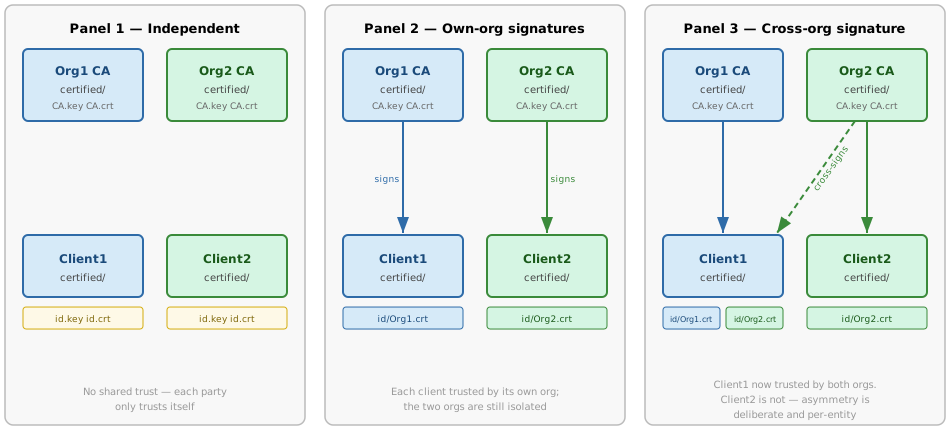
Panel 1 — Independent parties
Each party has run Certified.new() and has its own certified/ directory.
No cross-trust exists yet.
Client1's directory:
certified/
├── CA.key            # Client1's own CA private key
├── CA.crt            # Client1's own CA certificate
├── id.key            # Client1's identity private key
├── id.crt            # Client1's identity certificate (self-signed by CA)
├── known_servers/
│   └── self.crt      # Client1 trusts its own CA (created by Certified.new)
└── known_clients/
    └── self.crt      # Client1 accepts connections from itself
Client1 can only connect to services that trust its own CA. Org2's services will reject its certificate.
Panel 2 — Own-org signatures
Org1's CA signs Client1's identity certificate and delivers the result. Client1 receives Org1's service definition and stores it.
Org1 runs (signs Client1's id.crt and prints introduction JSON):
certified introduce client1_id.crt > intro.json
# Optionally add "services": {"org1-api": "https://api.org1.example:8443"}
# to the JSON before sending
Client1 runs (installs the introduction):
certified add-intro intro.json
# Saves id/<Org1-RFC4514-name>.crt and known_servers/org1-api.yaml
The equivalent Python calls:
c = Certified()
c.add_identity(signed_cert, org1_ca_cert)   # saves id/Org1.crt
c.add_service("org1-api", org1_service_def) # saves known_servers/org1-api.yaml
Why no explicit add-client step?
introduce signs Client1's cert using Org1's CA key. Org1's server
already has known_clients/self.crt — its own CA certificate — so any
cert signed by that CA is automatically trusted for inbound connections.
No separate certified add-client call is needed on Org1's side.
This is intentional: running introduce is the act of granting inbound
access. Revocation means rotating the CA identity.
Client1's directory after Panel 2:
certified/
├── CA.key
├── CA.crt
├── id.key
├── id.crt
├── id/
│   └── Org1.crt          # PEM chain: id cert signed by Org1 CA
├── known_servers/
│   ├── self.crt
│   └── org1-api.yaml     # Org1's service definition
└── known_clients/
    └── self.crt
known_servers/org1-api.yaml:
url: https://api.org1.example:8443
cert: <base64-DER Org1 CA certificate>
auths:
- CN=Org1 CA,O=Org1
url is the real network address. cert is the Org1 CA certificate to
verify the server's TLS certificate against. auths is the list of CA
subject names whose signatures Client1 should present when connecting
(matched against filenames in id/).
Client1 can now authenticate to Org1's services. Org2 still rejects it.
Panel 3 — Cross-org signature (asymmetric)
Org2 decides to grant Client1 access. Org2's CA signs Client1's identity certificate and delivers it along with Org2's service definition. Client2 receives no reciprocal signature from Org1 — this asymmetry is intentional and per-entity.
Org2 runs:
certified introduce client1_id.crt > intro2.json
# Add "services": {"org2-api": "https://api.org2.example:9443"} before sending
Client1 runs:
certified add-intro intro2.json
# Saves id/<Org2-RFC4514-name>.crt and known_servers/org2-api.yaml
The equivalent Python calls:
c.add_identity(signed_cert, org2_ca_cert)   # saves id/Org2.crt
c.add_service("org2-api", org2_service_def) # saves known_servers/org2-api.yaml
Client1's directory after Panel 3:
certified/
├── CA.key
├── CA.crt
├── id.key
├── id.crt
├── id/
│   ├── Org1.crt          # PEM chain: signed by Org1 CA
│   └── Org2.crt          # NEW — PEM chain: signed by Org2 CA
├── known_servers/
│   ├── self.crt
│   ├── org1-api.yaml
│   └── org2-api.yaml     # NEW — Org2's service definition
└── known_clients/
    └── self.crt
known_servers/org2-api.yaml:
url: https://api.org2.example:9443
cert: <base64-DER Org2 CA certificate>
auths:
- CN=Org2 CA,O=Org2
Client1 can now authenticate to both Org1 and Org2's services.
How Certified.Client resolves a connection
When Client1 makes a request to an aliased service name, Certified.Client
performs three steps automatically.
Step 1 — Alias lookup (netloc → service definition)
with c.Client("https://org2-api/some/path") as http:
    resp = http.get("/endpoint")
urlparse("https://org2-api/some/path") extracts hostname = "org2-api".
Certified.lookup_server("org2-api") reads
known_servers/org2-api.yaml and returns a TrustedService object:
TrustedService(
    url   = "https://api.org2.example:9443",
    cert  = "<b64-DER Org2 CA cert>",
    auths = ["CN=Org2 CA,O=Org2"],
)
replace_baseurl(url, srv.url) rewrites the request URL to
https://api.org2.example:9443/some/path. The alias org2-api is never
sent on the wire.
Step 2 — Client certificate selection
ssl_context(is_client=True, srv=org2_service) calls
get_chain_from(["CN=Org2 CA,O=Org2"]).
get_chain_from scans id/ for a file whose stem matches an entry in
auths:
- Finds
id/Org2.crt→ stem"Org2"… wait, stems are RFC 4514 names.
Note
add_identity names the file using rfc4514name(ca_cert.subject), so
the filename is the full RFC 4514 distinguished name of the signing CA
(e.g. CN=Org2 CA,O=Org2.crt). The auths list in the service
definition must use the same format.
get_chain_from returns (id/Org2.crt bytes, b"") — the leaf cert is
already the signed chain; no additional intermediate is needed.
Step 3 — SSL context assembly
The SSL context is built with:
- Client certificate:
id.key+ the PEM chain fromid/Org2.crt - Server CA: the specific
certfrom the service definition (Org2's CA), loaded viactx.load_verify_locations(cadata=pem). Using a pinned CA (rather than the wholeknown_servers/directory) means the TLS handshake will only accept this exact server CA — a tighter trust anchor.
The resulting ssl.SSLContext is passed to httpx.Client(verify=ssl_ctx).
During the TLS handshake:
- Client presents
id.key+id/Org2.crt→ Org2's server verifies this against itsknown_clients/directory. - Server presents its cert → Client verifies it against the pinned Org2 CA.
After the handshake, mTLS is established and the request proceeds to
https://api.org2.example:9443/some/path. What Client1 is then allowed
to do is up to Org2's authorisation policy — see Authorization Model.